Sync: Adjust Audio to Piano Signal

Sync is a temporary fix for a song that doesn't sound right. The real answer would be to re-record the music. But since that probably won't happen, this is a good way to fix a song at least for the time being.
Usually if the audio does not match the piano signal, you can easily fix it using sync. There are times however when the audio and piano sync discrepancy varies throughout a song. If this happens, all you can do is adjust it as close as you can and leave it. Every song is different. Every artist is different. Every recording is different. There are a lot of variables. The probability of Sync actually fixing a song, depends on the difference between the audio and piano signal (as far as timing with respect to one another) remaining constant throughout a song. Sometimes it doesn't. However it's still worth it to have this feature.
Let's start with the Beatles. It has been my experience that most of the orchestrated Beatles music is off a bit as far as timing is concerned. So this is how you fix it:
Usually if the audio does not match the piano signal, you can easily fix it using sync. There are times however when the audio and piano sync discrepancy varies throughout a song. If this happens, all you can do is adjust it as close as you can and leave it. Every song is different. Every artist is different. Every recording is different. There are a lot of variables. The probability of Sync actually fixing a song, depends on the difference between the audio and piano signal (as far as timing with respect to one another) remaining constant throughout a song. Sometimes it doesn't. However it's still worth it to have this feature.
Let's start with the Beatles. It has been my experience that most of the orchestrated Beatles music is off a bit as far as timing is concerned. So this is how you fix it:
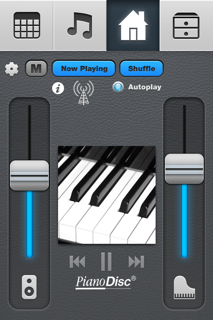
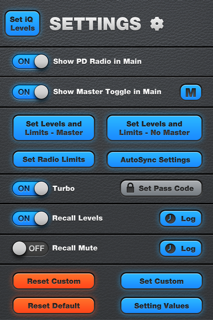
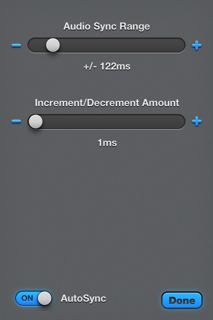

1. Touch Settings.


2. Enter 0000

3. Touch AutoSync Settings.

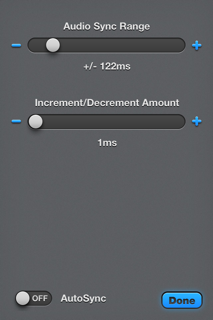
4. Turn on "AutoSync"

5. Now Touch "Done".

6. Touch the Cog it takes you Home again.
6. Notice how this button is now in Main.


7. Adjust this to the right...start at about 60mS


8. I started at 60, I pushed the plus button until I reached 71. That seemed to fix "Day Tripper".


9. Touch this when done. This will take you back to "Main". The next time the song plays, your adjustment will happen automatically.